
Trading options
Each option leg has its own pool, paired against USDC. Buying an option means swapping USDC into that pool; selling means swapping the option token back out. The dApp page is /swaps.
How a quote is built
The AMM is a constant-product market maker, the same curve as Uniswap V2, with one addition: the fee is not fixed.
On every swap the router computes two prices:
- the pool price, implied by the current reserves
- the model price, from the closed-form pricing formula, using the live Chainlink price of the underlying, the strike, and the time left to expiry
The gap between them sets the fee. Trading a pool that sits close to fair value costs the 2% floor. Trading one that has drifted far away costs more, up to a 100% cap. This is what protects liquidity providers on an asset whose fair value moves continuously — see Dynamic swap fee for the curve and the reasoning.
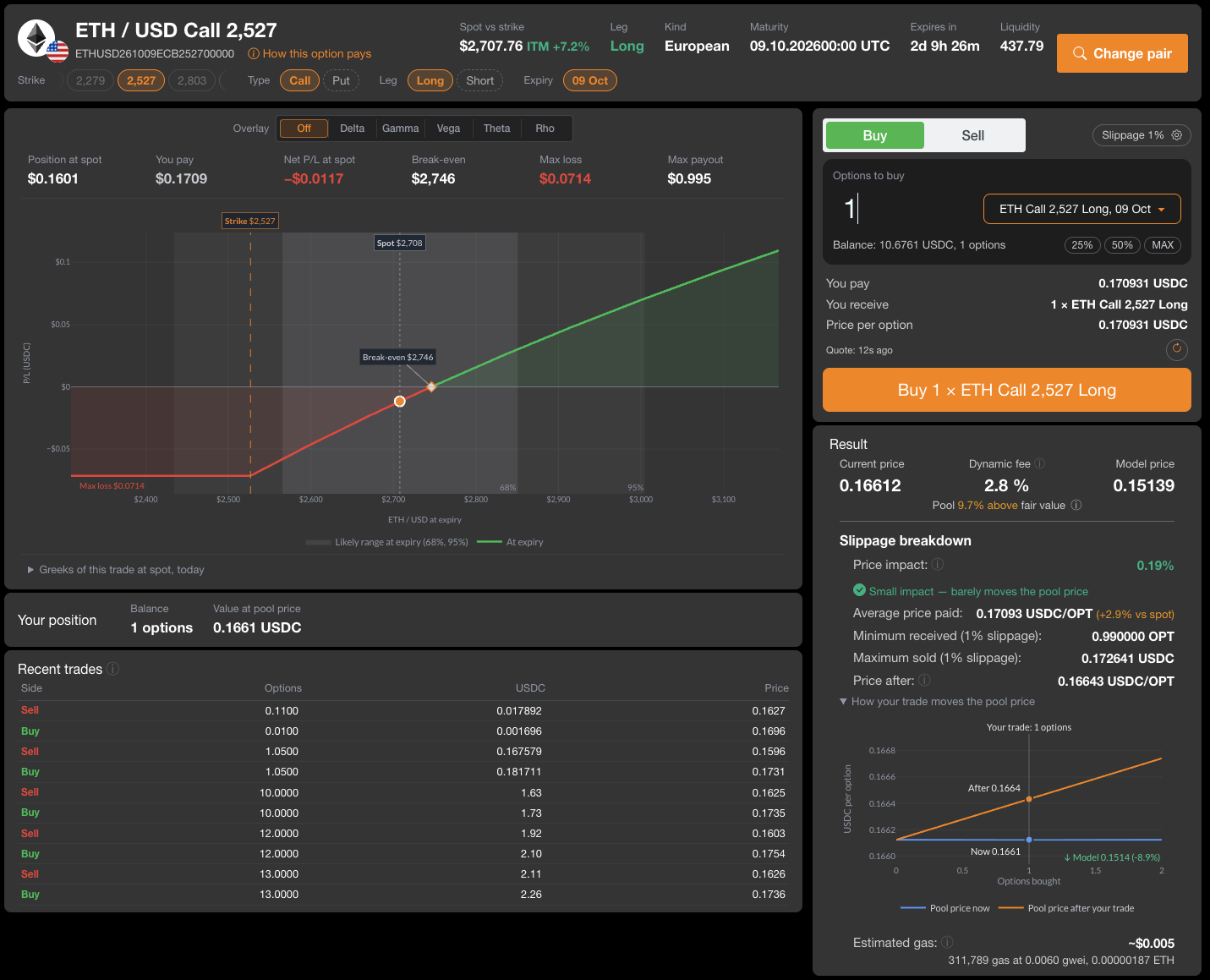
The Result panel on /swaps shows both prices side by side: Current price (the pool), Model price, the Dynamic fee they produce, and how far the pool sits above or below fair value.
The fee is always charged in USDC
Whichever direction you trade, the fee is taken on the USDC side, because that is what liquidity providers want to be paid in. When you buy, it is added on top of the USDC you asked to spend. When you sell, it comes out of the USDC you receive.
Choosing what to trade
Trading starts from the list of existing pools, not from a set of parameters. A pool exists for a given option leg only if someone minted that option and seeded liquidity against it, so the tradeable universe at any moment is a small subset of the grid.
The header of /swaps shows the selected pair: underlying, strike, type, leg, expiry, spot versus strike, time to expiry and pool liquidity. Two ways to switch:
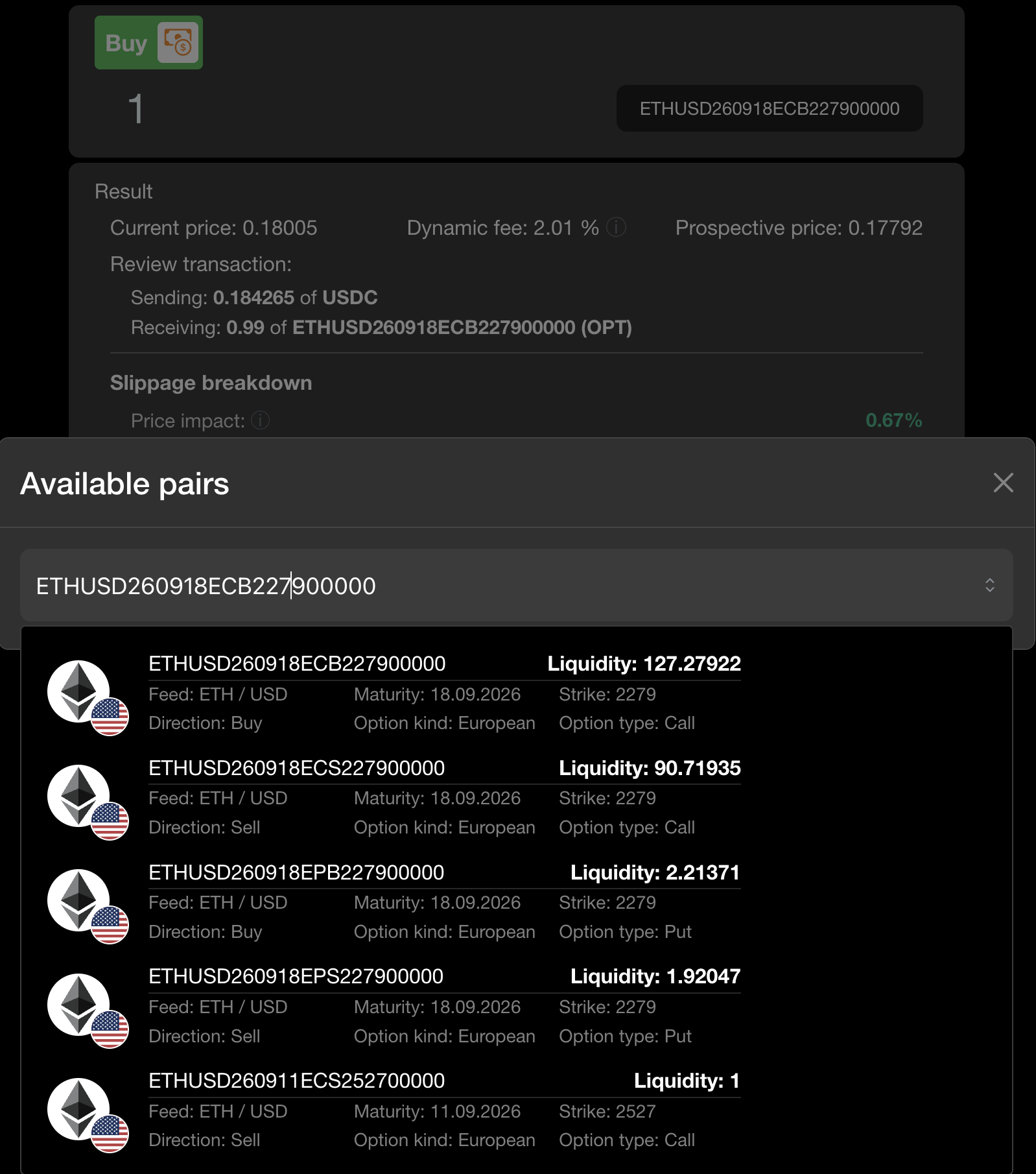
- Change pair opens the list of every available pair with its parameters and its liquidity. It searches on any of them — type an underlying, a strike or an expiry to filter. Hide expired pairs is on by default; Only my pairs keeps the pools where you hold LP tokens.
- The Strike, Type, Leg and Expiry chips under the title jump to a neighbouring option of the same underlying.
Pick on two criteria at once:
- Fit — how close the option's strike, expiry and type are to the view you want to express.
- Depth — whether the pool can absorb your size without moving the price against you.
A pool that fits perfectly but holds almost nothing is worse than a near-miss with depth. If neither exists, the market you want simply hasn't been made: mint the option and seed the pool yourself.
Reading the page
Around the order ticket, /swaps shows what the trade does to you before you sign:
| Block | What it shows |
|---|---|
| P/L chart | Profit or loss at expiry against the underlying price, with the strike, current spot, break-even and the likely range at expiry (68% and 95%). The row above it: position value at spot, what you pay, net P/L at spot, break-even, max loss, max payout |
| Overlay | Adds one Greek (Delta, Gamma, Vega, Theta, Rho) to the chart. Greeks of this trade at spot, today lists them as numbers |
| Your position | Your balance of this leg and its value at the pool price |
| Recent trades | The last swaps in this pool: side, options, USDC, price |
| Result | Pool price, model price, dynamic fee, and the Slippage breakdown: price impact, average price, minimum received, maximum sold, pool price after your trade, estimated gas |
Buying a leg
You spend USDC and receive option units.
- Pick the pair (see above).
- Set the switch to Buy and enter the number of options you want.
- Check the quote: You pay (USDC, fee included), Price per option, and in the Result panel the dynamic fee and Maximum sold.
- Click Buy. The first time, the wallet asks you to approve USDC for the router; then it asks for the swap.
"Quote: 12s ago" shows how old the quote is; the round arrow next to it reads the pool again. Slippage (1% by default, the gear button) sets two limits: the minimum options you accept and the most USDC the swap may pull.
The maximum sold figure matters. Because the fee depends on the pool's divergence at the moment of execution, and that can move between your signing and your transaction landing, the router takes an explicit cap:
swapStableOnTrade(
    amountStable,      // USDC you want to spend
    maxStableAllowed,  // hard cap on total USDC pulled, fee included
    amountStableMin,   // minimum option units you'll accept (slippage guard)
    tradeToken,        // SF Options address
    tokenId,           // the leg you're buying
    to,
    deadline
)
If the live fee would push the total past maxStableAllowed, the swap reverts with ROUTER: STABLE_AMOUNT_EXCEEDS_MAX and you keep your USDC. The dApp sets the cap to You pay plus your slippage tolerance — the "Maximum sold" line. At the fee cap the total can reach roughly twice amountStable, so if you call the router directly, a cap of 2 × amountStable accepts any fee the curve can produce, and a tighter cap refuses to trade an over-divergent pool.
Selling a leg
You send option units and receive USDC.
- Pick the pair, set the switch to Sell and enter the number of options to sell.
- Check You receive (USDC, fee already taken out) and Minimum received.
- Click Sell. The first time, the wallet asks for operator approval for the router; then it asks for the swap.
swapTradeOnStable(
    amountTrade,     // option units to sell
    amountTradeMin,  // minimum USDC out (slippage guard)
    tradeToken,
    tokenId,
    to,
    deadline
)
The operator approval is ERC-1155 setApprovalForAll for the router, asked once per wallet.
Rules and rejections
| Condition | What happens |
|---|---|
| Past the maturity timestamp | Reverts, ROUTER: INCORRECT_MATURITY. Trading stops when the option expires |
| Amount below one cent | Reverts, ROUTER: AMOUNT_BELOW_PRECISION. All amounts are whole cents |
| Output worse than your minimum | Reverts, ROUTER: INSUFFICIENT_OUTPUT_AMOUNT |
| Total cost above your cap | Reverts, ROUTER: STABLE_AMOUNT_EXCEEDS_MAX |
deadline passed |
Reverts, ROUTER: EXPIRED |
| No pool for that leg | Nothing to trade against — someone must add liquidity first |
Thin pools move a lot
A large order into a shallow pool moves the price against you and raises the fee, because the price you push the pool to is further from the model price.
Trading somewhere else
Option legs are standard ERC-1155 tokens. Nothing obliges you to use SF Swap: you can transfer a leg directly to a counterparty, or trade it on any venue that supports ERC-1155. SF Swap exists because a pool per leg is the only way to get continuous two-sided liquidity on a grid this large, not because the protocol requires it.
Next
- Dynamic swap fee — why the fee moves, and how far
- Exercise & settlement — holding to expiry instead of selling
- Providing liquidity — being on the other side of these trades