
Quick start
Five steps from an empty wallet to an open position. Budget ten minutes, most of it waiting for a bridge.
1. Point your wallet at Base
The protocol lives on Base mainnet, chain ID 8453. Any EVM wallet works — MetaMask, Rabby, Coinbase Wallet, a hardware wallet behind either.
You need a small amount of ETH on Base for gas. Base fees are fractions of a cent, so a couple of dollars lasts a long time.
2. Get USDC on Base
USDC is the only collateral and the only quote asset. Everything is denominated in it.
Use native Base USDC at 0x833589fCD6eDb6E08f4c7C32D4f71b54bdA02913 — the Circle-issued token, not a bridged variant. A bridged version USDC.e balance will simply not be seen by the contracts.
3. Open the dApp and connect
Go to dapp.stochastic.finance/swaps and click Sign in in the top bar. One click connects the wallet and asks for a signature — a plain message, no transaction and no gas. Confirm the network indicator reads Mainnet Base.
Sign-in is required on every page that trades: swaps, liquidity, issuing, balances, history. The signature proves the address is yours. Connecting a wallet without signing unlocks nothing.
Signing in does not restrict the protocol itself: the contracts are permissionless and anyone can call them directly. It only applies to this interface.

4. Pick a position
You have three ways in, and they are genuinely different activities:
| You want | Go to | What happens |
|---|---|---|
| To buy an option | /swaps |
You spend USDC and receive one leg of an existing option. Trading options |
| To write options | /issue_options |
You post USDC collateral and receive both legs, then sell one. Minting options |
| To earn fees | /add_liquidity |
You seed a pool with USDC and option tokens. Providing liquidity |
If you are here to take a view on a price, you want the first one.
Buying your first option
You don't build an option from parameters here — you pick one of the pools that already exist.
- On
/swaps, click Change pair to see the available pairs. Each entry shows the option's leg parameters and how much liquidity it holds. - Search by typing any parameter — an underlying, a strike, an expiry date — to narrow the list to pools matching what you're after.
- Pick the pool whose parameters are the closest fit to your view and that has enough liquidity to absorb your swap size.
- Set the switch to Buy, enter the number of options, and check You pay and the P/L chart.
- Click Buy. Approve USDC if the wallet asks, then confirm the swap.
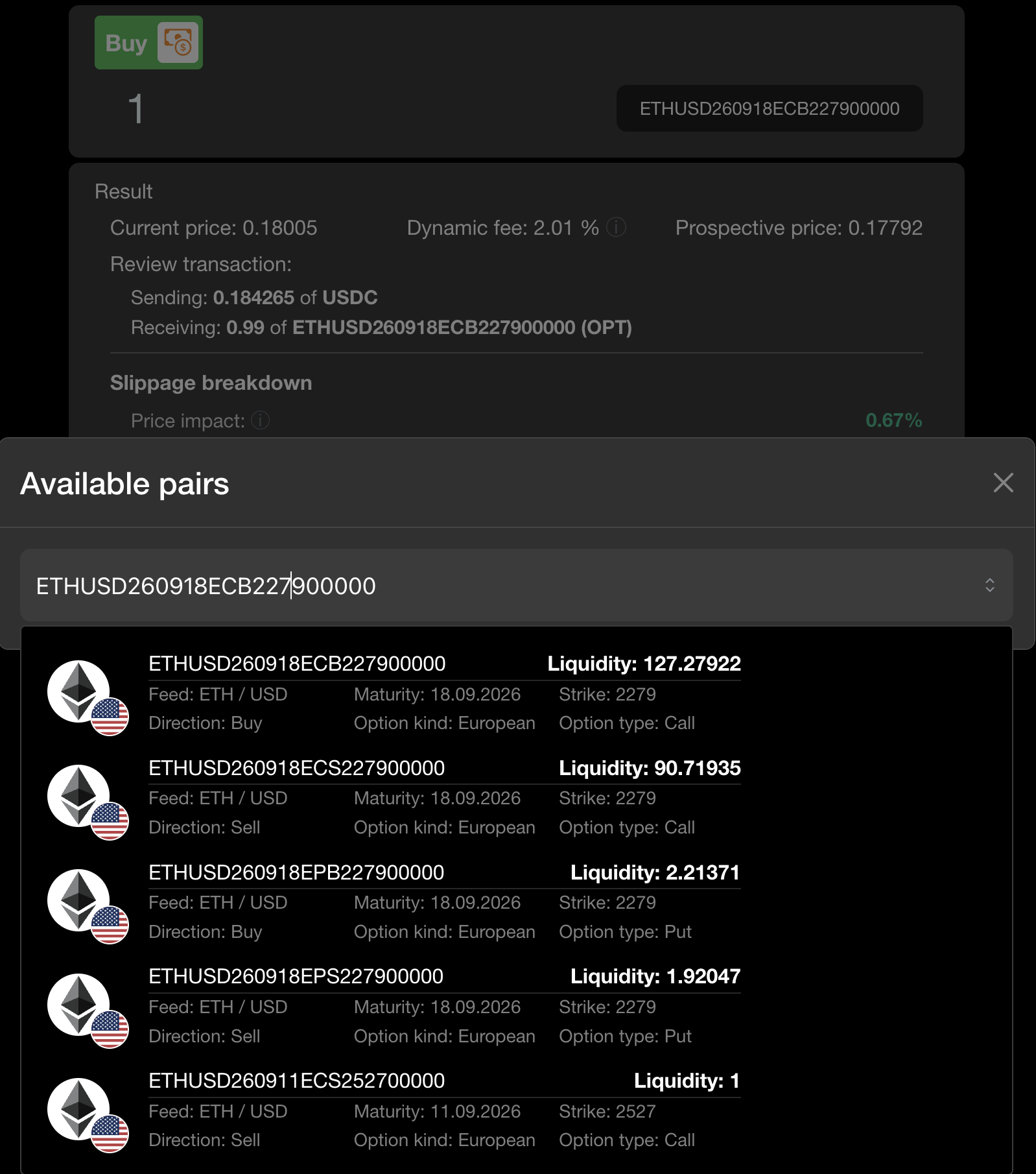
What You pay includes
You pay is the full USDC the swap takes: the pool price for your options plus the AMM's fee. The fee is taken in USDC and is dynamic — it grows as the pool price drifts from the model price. A pool trading close to fair value charges the 2% floor. The Result panel shows the current fee. See Dynamic swap fee.
5. Wait for expiry, then exercise
European options settle only at expiry. After your option's Friday starts:
- Go to
/options_balance, click Check balances and find the position. - Click Exercise in its card (under Details), enter the amount and confirm. The contract pays out your leg's share of the collateral in USDC, less the protocol's 0.5% fee on that payout.
Nobody else needs to act for this to work — you are settling against the contract, not against a counterparty. And you don't have to be quick: an expired option keeps its value until you claim it.
You can leave before expiry
Holding to expiry is optional. Any leg can be sold back on /swaps at any time up to its maturity, which is usually how a profitable position gets closed.
What to read next
- Core concepts — the five ideas that make this protocol different from a vanilla options venue. Worth 5 minutes before you size up.
- Payoff & pricing — exactly what you'll be paid at expiry.
- Fees — who takes what, and when.